Claude Code plugin • Windows • Free
cc-mascot
Anime desktop mascots that react live as Claude Code thinks, works, waits and finishes.
- Python
- Windows
- Claude Code
A face for every turn
Every Claude Code session gets its own little companion on your desktop. She thinks while Claude thinks, works while tools run, looks up when Claude needs you and cheers when the turn is done. You can tell how a long job is going from across the room.
Pick Hatsune Miku, or Yunseul, the sleepy vampire doll from Inhyeong RPG. Each has her own moods, colors and effects, from Miku's music notes to Yunseul's bats and cross stitches.
Her moods
-
Thinking
A thought bubble
Working out an answer, between tool calls, while compacting.
-
Working
Humming, notes and a level meter
A tool runs, or subagents are at work.
-
Waiting
An alert bubble
A permission prompt, a question or a plan to approve.
-
Happy
Arms up, hearts and sparkles
The reply and every agent are finished.
-
Worried
A nervous sweat drop
A request has streamed nothing for 10 seconds.
-
Error
Glitching out
A tool failed, or a reply ended on an error.
-
Sleepy
Dozing, with drifting Zs
Nothing has happened for 5 minutes.
-
Held
Legs dangling
While you drag her around your desktop.
-
Thinking
A lace bubble
Working out an answer, between tool calls, while compacting.
-
Working
Sewing cross stitches
A tool runs, or subagents are at work.
-
Waiting
A bat peeking in
A permission prompt, a question or a plan to approve.
-
Happy
Roses and bats
The reply and every agent are finished.
-
Worried
A trembling ghost
A request has streamed nothing for 10 seconds.
-
Error
A pouty tantrum
A tool failed, or a reply ended on an error.
-
Sleepy
Yawning with her bunny
Nothing has happened for 5 minutes.
-
Held
Legs dangling
While you drag her around your desktop.
The big finish
When a big job finishes, two minutes or more of work or one
that used subagents, she skips the usual cheer and fires her
signature move. Type /mascot beam to see it whenever you like.
She keeps an eye on your session
Long sessions and usage limits show on her too, whatever her
mood, so you know when it is time to
/compact before Claude does it for
you.
-
300k context
A teal aura
-
400k context
Pink, with sparkles
-
500k context
Overload, time to /compact
-
5-hour limit at 90%
A failing stage light
-
Weekly limit at 90%
A fading hologram
-
300k context
Moonlight
-
400k context
Crimson, petals and bats
-
500k context
A blood moon beating
-
5-hour limit at 90%
Candles guttering
-
Weekly limit at 90%
Fading into a ghost
Playing with her
-
Drag her anywhere
On any display. She goes shy, swings from where you hold her and lands with a little bounce. Each spot remembers where you put her.
-
Hover for the details
Context used and how fast it grows, turns left before auto-compact, your 5-hour and weekly limits, the model and each subagent.
-
One per session
Several sessions stand side by side, never on top of each other, each with a tag naming its project.
-
Double-click, right-click
Double-click sends her back to her spot. Right-click hides her. /mascot brings her back.
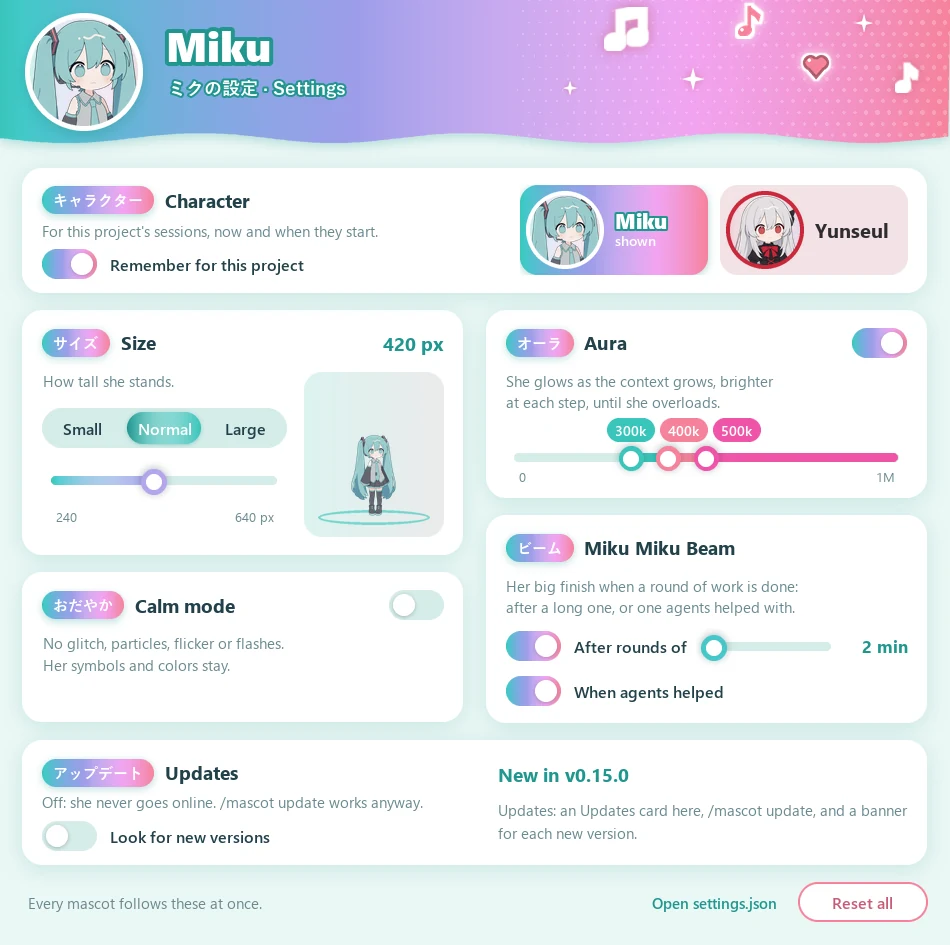
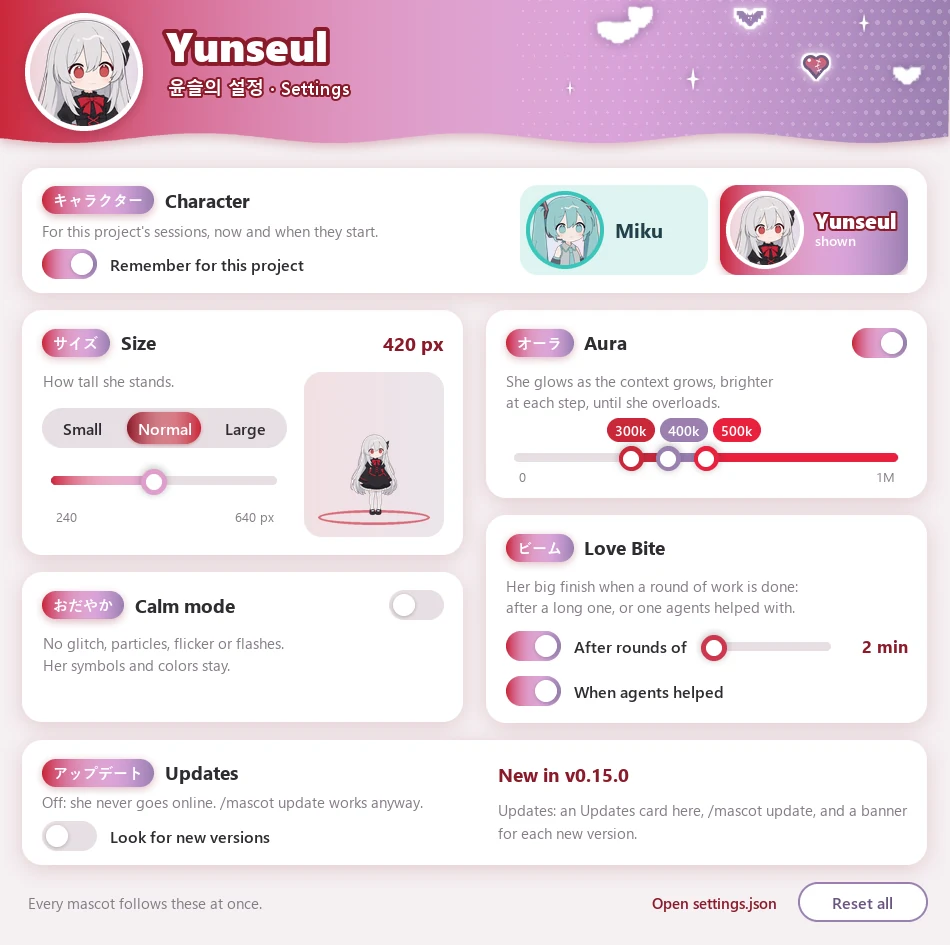
A settings window picks her character, size, calm mode (no glitches, particles or flashes) and when her aura and beam kick in, and shows her version with an Update button. It takes on her colors as you pick.
Install
You need Windows and Python 3 with Pillow (pip install pillow), with
pythonw on your PATH. Then, inside
Claude Code:
- 01 Add the marketplace
/plugin marketplace add desuqcafe/cc-mascot - 02 Install the plugin
/plugin install mascot@cc-mascot - 03 Pick who keeps you company
/mascot character yunseul
She beams in at the bottom-right of your main display. Turn
on auto-update in /plugin to keep
her current, or clone the repository and load it by hand, as the
README
explains.
- Offline by default. The plugin writes a small status file per session and the overlay reads it. Update checks are opt-in, one read of the version number a day.
- Each new version greets you with her NEW! banner and a note on what changed. /mascot update brings her up to date.
- She can never break a session. The plugin only watches events and never changes what Claude does.
- About 125 MB of memory and a few percent of one CPU core while shown, 20 MB while hidden.
The code is MIT. Hatsune Miku is © Crypton Future Media, INC., and her art here is non-commercial fan art under the Piapro Character License. Yunseul is © desuqcafe, all rights reserved. cc-mascot is an unofficial fan project, not made by or affiliated with Anthropic or Crypton Future Media.
View on GitHub